A photographic prism ring is a ring-shaped image distortion that resembles chromatic glass. On the homepage, the ring copies the photograph beneath it, rotates the sampled detail, and separates the red and blue samples. The center and exterior remain transparent. The photograph supplies the colors and recognizable features that make the band look refractive.
This case study follows the renderer used on Cameron.stream. The effect uses a transparent Canvas 2D layer, with no WebGL dependency or continuous animation. Its parameters are visual approximations rather than measurements of physical glass.
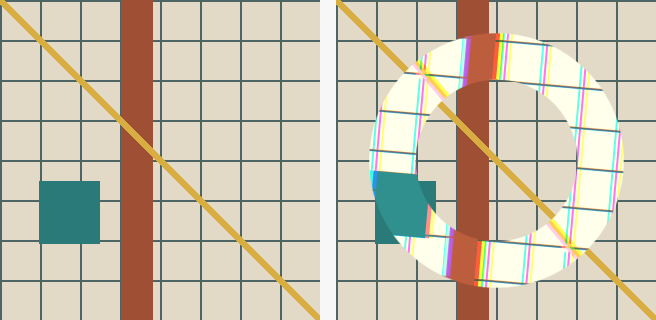
The illustration uses a synthetic grid to expose the sampling changes: source image on the left, ring output on the right. The homepage applies the same method to a photograph.
Match the photograph first
The renderer draws the background photograph into a second, offscreen canvas. Its scale and crop must match the visible CSS background. A different crop makes the ring look like an unrelated image pasted over the page.
For a cover background, the scale is the larger of the viewport-to-image width and height ratios. For an explicit background width, the renderer derives the height from the image's aspect ratio. Background position sets the offset within the remaining space. At a 50% horizontal position, that offset is half the difference between viewport width and scaled image width.
The script waits for image decoding and font loading before drawing. Font readiness matters because the greeting's measured position helps locate the ring. It then uses drawImage to reproduce the crop and getImageData to read the source pixels.
Restrict the effect to an annulus
An annulus is the region between two concentric circles. For a pixel at distance from the ring's center, a centerline radius , and a half-width , the renderer computes:
Only pixels with receive color. The alpha value increases from zero at either edge to full opacity over 1.5 CSS pixels:
The output buffer starts transparent. That preserves the ordinary photograph inside and outside the ring without a separate cutout or painted center. A final putImageData writes the ring onto the overlay canvas.
Rotate detail and separate color samples
Each output pixel looks up its color at a different location in the source photograph. This inverse-sampling approach keeps the output ring fixed while changing the image seen through it.
Let be the output pixel's offset from the ring center. For channel index , where red is 0, green is 1, and blue is 2, the renderer shifts the horizontal coordinate by . Red and blue therefore move in opposite directions; green stays unshifted. The source lookup applies a 5-degree rotation around the center:
Here is the ring center, is the channel shift, and is 5 degrees. The rotated scene detail produces the displacement; the separated channels produce colored fringes. The shift occurs before rotation, so it does not model wavelength-dependent radial refraction.
The lookup usually lands between source pixels. Bilinear interpolation blends the four surrounding pixels using their horizontal and vertical distances. That interpolation prevents the rotated detail from becoming a staircase of nearest-neighbor samples.
The homepage multiplies sampled color channels by 1.18 and clips at 255. That brightness adjustment helps the glass band stand apart from the photograph. It operates on encoded channel values rather than a physical light-transport calculation.
Size the band for portrait and landscape
The shipped settings use CSS-pixel-sized canvas buffers:
| Setting | Desktop | Phone below 680 px wide |
|---|---|---|
| Full band width | 96 px | 48 px |
| Channel shift magnitude | 4 px | 2.4 px |
| Source rotation | 5 degrees | 5 degrees |
| Brightness multiplier | 1.18 | 1.18 |
Phone radius is the smaller of 43% of viewport width and 30% of viewport height. That height limit constrains the ring on landscape phones. Desktop radius uses the smaller of 30% of width and 37% of height. The greeting anchors the preferred vertical placement, with additional space reserved for the navigation. A second clamp uses the full outer edge to keep the band inside short viewports when the diameter fits.
The responsive helper also selects the channel shift. Passing its complete geometry object to the pixel renderer preserves the phone's 2.4-pixel shift; omitting that property uses the renderer's 4-pixel desktop default. For a container smaller than the ring's outer diameter, shrink the ring or omit the decoration rather than relying on the placement clamp.
Canvas dimensions, source pixels, and ring geometry use the same coordinate system. A higher-density backing buffer requires scaling every radius, offset, and feather distance together. Changing only the canvas resolution changes the apparent effect.
Keep the effect separate from interaction
The overlay sits above the photograph and below the greeting. It ignores pointer events and is hidden from assistive technology because it adds no information. The underlying photograph and links remain usable if drawing fails.
The script draws once after decoding, then redraws on resize. A single animation-frame callback coalesces resize events; no idle loop changes the image. The ring and photograph share entrance timing. Reduced motion removes the ring's fade and shortens the photograph's transition to 10 milliseconds. Establishing the ring's hidden state before the first draw prevents a bright band from appearing before the photograph.
The surrounding navigation uses a static glass treatment. Keeping its labels outside the distortion separates the decorative surface from the controls, consistent with the site's design system.
Reuse the technique
Download the skill, or read its instructions. The package contains a pure pixel renderer, the responsive sizing recipe, and offline synthetic tests. It includes no photograph and makes no network calls during its tests.
The tests check the transparent center and exterior, edge feathering, unshifted sampling, color-channel displacement, rotation, rejected inputs, and portrait/landscape sizing. Browser checks remain necessary for background alignment, text placement, reduced motion, and click targets. Those checks prove different properties from the pixel tests.
The renderer expects opaque source imagery and writes its own annulus alpha. Cross-origin images require suitable permission headers before their pixels can be read. Full-size source and output buffers also consume memory proportional to the viewport area. The implementation has no measured frame-rate claim and does not simulate refractive indices, Fresnel reflection, or wavelength-dependent light transport.